Designing ColabCanvas: Building a Real-Time Collaborative Whiteboard
Published on July 2026 • 6 min read
A walkthrough of the architecture behind ColabCanvas, covering WebSockets, persistence, synchronization, and the trade-offs of building real-time collaboration.
When I started building ColabCanvas, my goal wasn’t to build another whiteboard application.
I wanted to understand the engineering behind real-time collaboration.
Most collaborative apps feel simple when you’re using them. You draw something, everyone else sees it almost immediately. You don’t really think about everything happening behind the scenes until you try building it yourself.
Once I started building something similar myself, I realized that drawing on a canvas was actually the easiest part.
The difficult questions appeared once more than one person joined the room.
How should users communicate with the server? Where should drawing data be stored? How does someone joining late see everything that’s already been drawn? How do multiple users stay synchronized without constantly refreshing the page?
Those were the questions I kept running into while building, and they shaped almost every architectural decision in ColabCanvas.
This article is a walkthrough of those decisions, why I made them, and what I’d approach differently if I were building the project again.
Separating Responsibilities Early
One of the earliest decisions I made was separating traditional application logic from real-time communication.
Authentication, room creation, and loading an existing canvas all happen occasionally. They’re classic request-response operations, so exposing them through a REST API felt natural.
Drawing events are completely different.
The moment someone finishes drawing, every connected user should see that update almost immediately. That kind of communication is continuous, making WebSockets a much better fit.
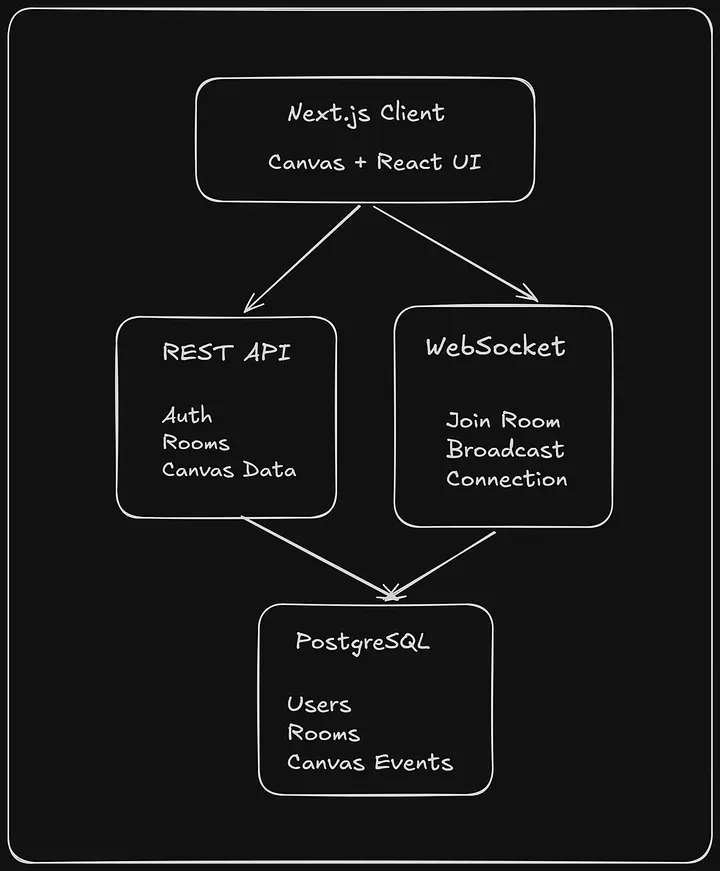
Instead of putting everything behind a single backend, I ended up with two services. The HTTP API manages authentication, rooms, and loading existing canvas history, while the WebSocket server is responsible for synchronizing drawing events between connected users.
Once the client authenticates, it establishes a persistent WebSocket connection and joins the requested room.
Synchronizing Multiple Users
Getting multiple users to see the same drawing at roughly the same time turned out to be the most interesting part of the project.
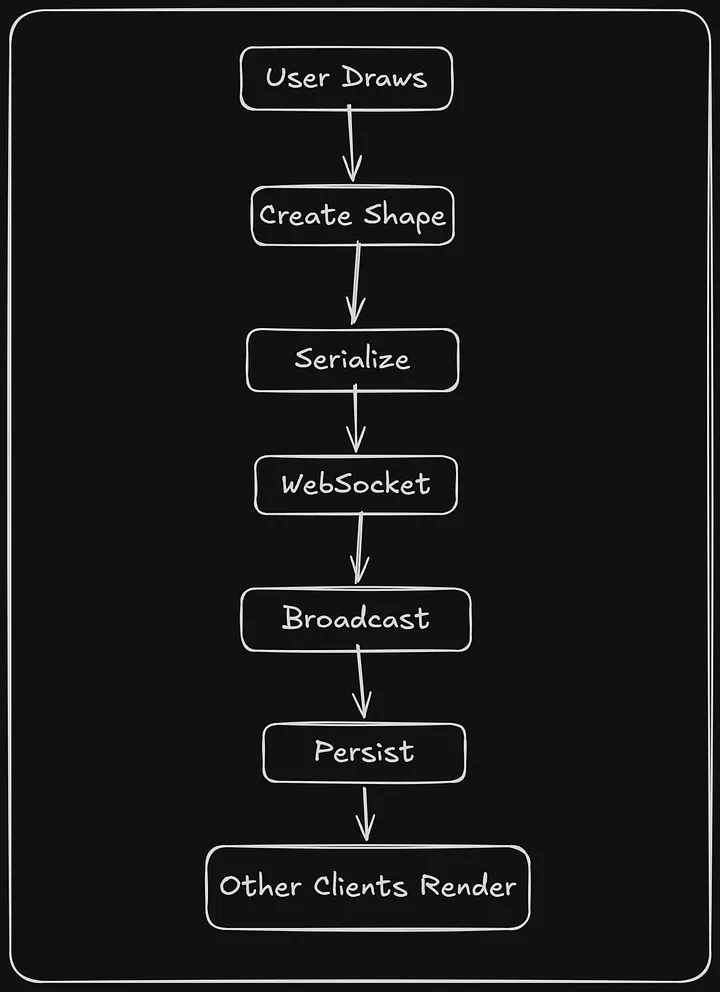
Every completed shape is converted into a JSON payload and sent through the WebSocket connection. The server broadcasts that message to everyone connected to the same room before persisting it in PostgreSQL.
One design choice that simplified the system was synchronizing completed drawing operations instead of every mouse movement.
While someone is dragging the mouse, everything happens locally inside the browser. Once the interaction finishes, the completed shape is sent to the server as a single event.
That keeps network traffic relatively small while still making the application feel responsive.
Every completed drawing operation is serialized and transmitted as a single event. Other clients don’t receive individual mouse movements, they only receive the completed operation.
Persisting the Canvas
Real-time collaboration only solves half the problem.
The canvas also needs to survive after everyone disconnects.
One design decision I spent some time thinking about was how the canvas should be persisted.
The more I thought about it, the less sense that approach made.
Drawing one rectangle shouldn’t require rewriting an entire board.
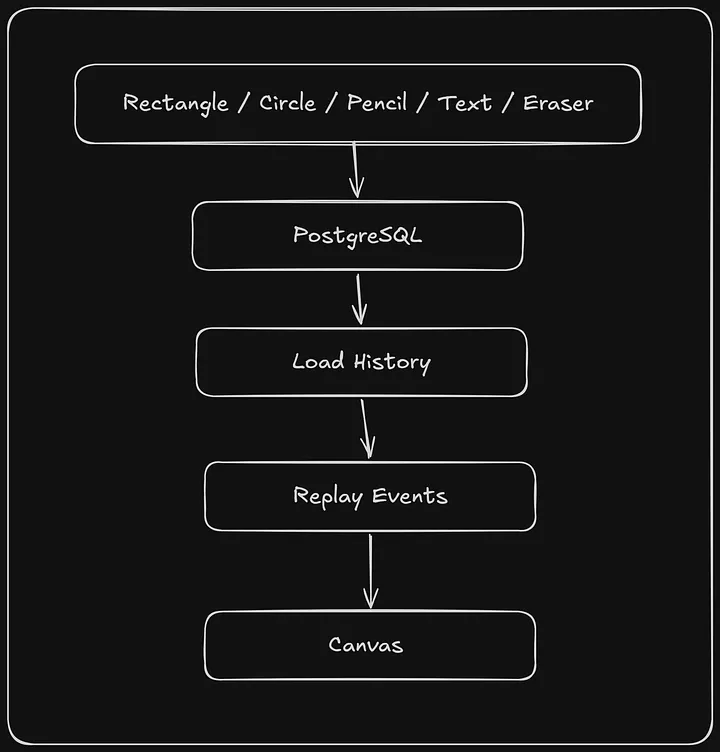
Instead, each completed drawing operation is stored individually. Whether it’s a rectangle, a freehand stroke, text, or an erase action, every operation becomes its own database record.
When someone joins an existing room, the server loads the most recent drawing events and replays them to reconstruct the canvas.
One downside of this approach is that rebuilding the canvas becomes slower as more drawing events accumulate. If I continued developing the project, introducing periodic snapshots would reduce the amount of history new clients need to replay.
Keeping the Drawing Engine Separate
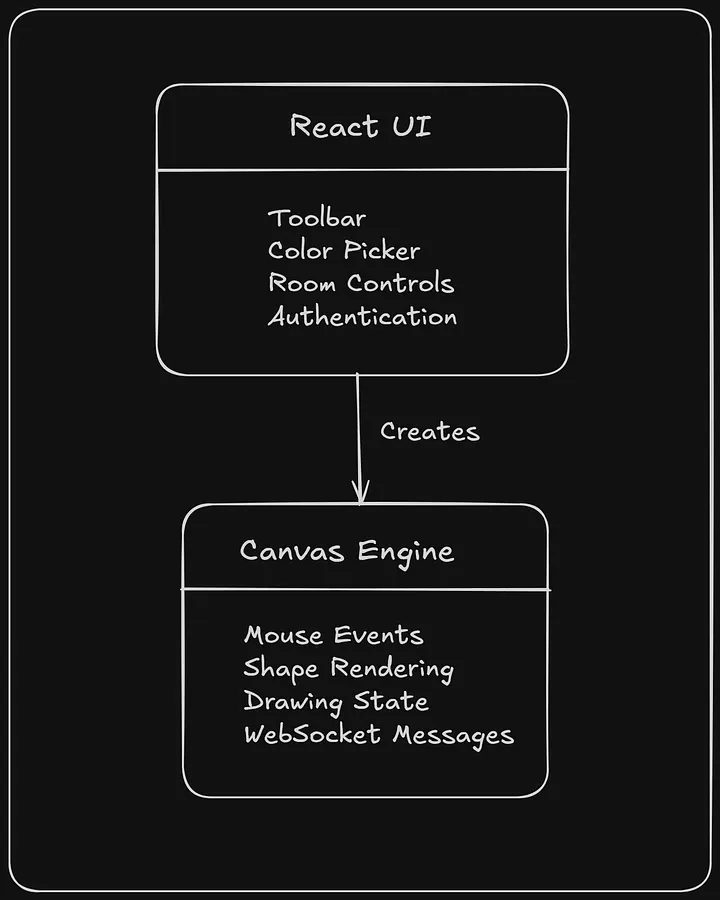
Another decision that made the codebase easier to manage was separating the drawing engine from the React application.
React is responsible for rendering the interface toolbars, dialogs, room management, and navigation.
The canvas engine has a completely different responsibility. It handles mouse interactions, rendering shapes, maintaining drawing state, and processing WebSocket events.
Keeping those concerns separate meant React wasn’t constantly re-rendering while someone was drawing, and the drawing logic stayed isolated from the rest of the application.
const draw = new Draw(
  canvas,
  roomId,
  socket
);
React creates the drawing engine once and lets it manage everything related to the canvas from that point onward.
The Trade-offs
Looking back, every architectural decision came with compromises.
Splitting HTTP and WebSocket responsibilities made the overall system much easier to understand, but it also meant maintaining two backend services instead of one.
Storing individual drawing operations kept database writes small and straightforward, although rebuilding a board inevitably becomes more expensive as its history grows.
Keeping room state in memory was the simplest solution for this project’s scope, but it also means the current architecture assumes a single WebSocket server. Scaling horizontally would require introducing shared state between instances.
None of these decisions were about finding the “perfect” architecture.
They were about choosing solutions that matched the scale of the project while helping me understand how real-time systems are designed.
What I’d Improve
If I picked this project up again today, there are a few things I’d prioritize.
The first would be adding periodic canvas snapshots so new users can load large boards more quickly.
I’d also spend more time improving reconnection handling so temporary network interruptions feel invisible to users.
Finally, if the application ever needed to support multiple WebSocket servers, I’d move room state into Redis so every instance could share the same view of connected users.
Those improvements aren’t driven by bugs in the current implementation. They’re simply the kinds of changes that become worthwhile as an application grows.
Final Thoughts
Building ColabCanvas changed the way I think about real-time software.
Before starting the project, I assumed the interesting part would be drawing on a canvas.
Instead, the real challenge was designing how information moves through a system.
Where does state live?
When should it be persisted?
How do multiple users stay synchronized?
How do new users catch up without affecting everyone else?
Answering those questions taught me far more than I expected.
ColabCanvas isn’t trying to compete with mature collaborative editors. It was an opportunity to explore the engineering decisions behind them, and in the process, it gave me a much deeper appreciation for what makes real-time applications feel so seamless to the people using them.
If you’d like to explore the implementation, the complete source code is available on GitHub Repo.